Free · Android app

Let your effort ripen.
Focus more, harvest free time.

Willpower-only app blockers don’t last. Ripen is a reward-based habit app: the more you focus and study, the more time you “harvest” for social and video apps. The camera presence check runs on your device, and you can turn it off per time window.

Android 8.0+ · Free · No ads · No account needed
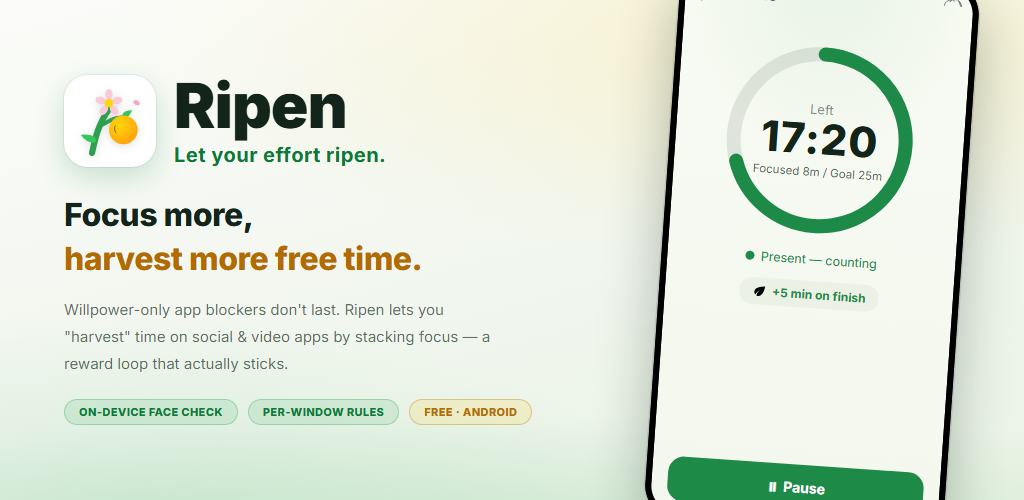
Ripen — the Android app where focus earns you free time. Focus timer screen

Don’t block with willpower. Change with rewards.

“Focus 25 min, use 5 min.” Free time ripens every time you finish a round — a reward loop that lasts.

Re-installed that blocker again and again, only to delete it?

You swear “I won’t touch it,” then you’re back on social media. Hard blocks are nonstop restraint — they don’t last.
Ripen flips the idea. Focus, and free time ripens as your “reward.”

Focus, then harvest. In 4 steps.

No complex setup. You only decide when to focus, for how long, and how much time you get back.

1

Set a time window

Paint the weekly grid to pick the days and hours you want to focus

2

Focus

With the presence check on, the front camera confirms you’re there as the timer counts down

3

Harvest free time

Each finished round earns the minutes you set (a word quiz works too)

4

Auto-lock when spent

At 0 minutes left, the apps you chose are gently blocked

Focus, and
free time “ripens.”

In windows with the presence check on, the focus timer only advances while your face is in front of the screen. Finish the goal and you earn the minutes you set for social or video apps. Rounds you quit early earn nothing.
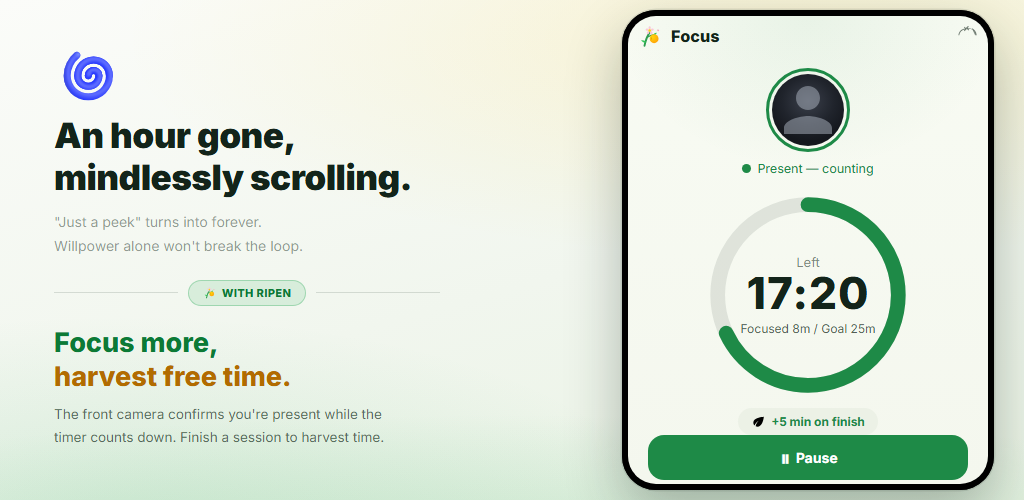
  • A countdown that runs only while you’re present (brief glances away are allowed)
  • Harvest “usable time” when you finish (none if you quit or stop early)
  • Set focus length (5–120 min), minutes earned and rounds
Focus timer screen: the countdown runs only while you’re present, and finishing earns 5 minutes

A growing sense of progress
keeps you going.

See usable time, focus today, earned today and your day streak at a glance. Weekly and monthly trend graphs and an hourly heatmap reveal when you focus best.
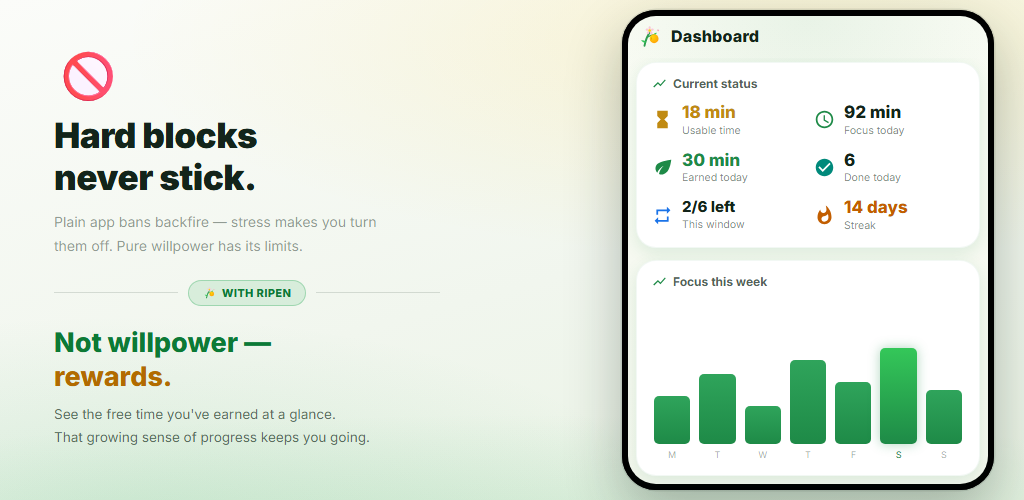
  • A summary card of where you stand right now
  • Focus trend graphs, a focus calendar and a weekly summary
  • “Earned vs. used” and blocked-app usage trends show the effect
Dashboard screen with usable time, focus today, day streak and this week’s focus chart

Your own rules,
for each time of day.

Just paint the weekly grid to set the days and hours you want to focus. Each window has its own focus goal, minutes per round, round cap, blocked apps and camera presence check. Outside the windows, you’re free.
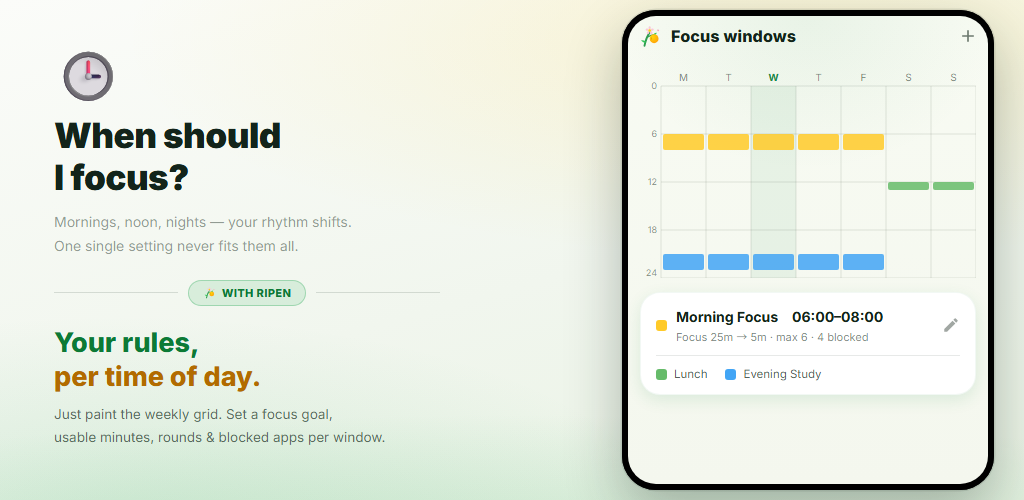
  • Paint the grid to set days and times in one go
  • Pick blocked apps by category for each window (with each app’s usage time)
  • Optional “pre-leisure” minutes you can use first
Focus windows screen: morning, lunch and evening windows on the weekly grid

At zero,
it locks gently.

Once you’ve used up a window’s time, opening a chosen app shows a block screen. Distracting apps are locked during focus sessions too. A “settings lock” stops you from loosening the rules later.
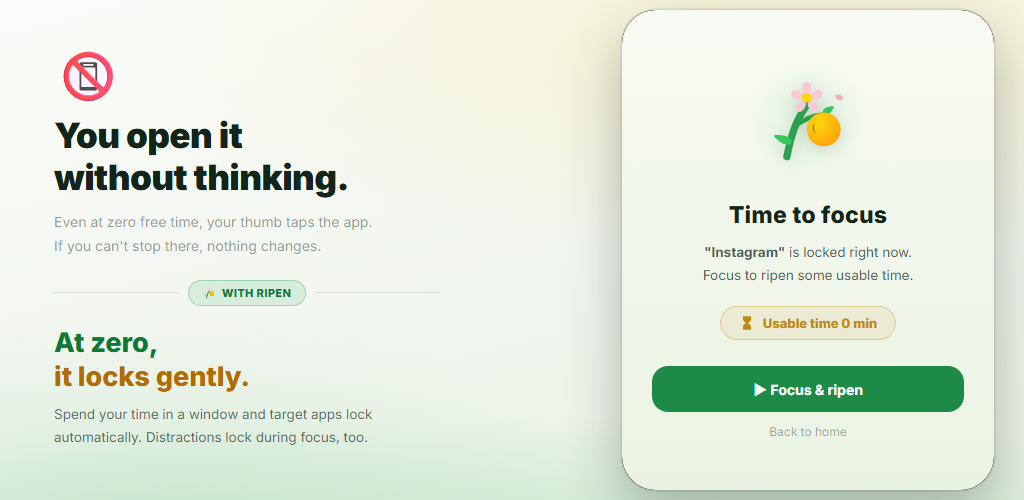
  • Target apps are blocked automatically at 0 minutes left
  • Earn time right from the block screen by focusing or with a word quiz
  • Settings lock prevents “I’ll loosen it later”
Block screen: opening an app with 0 minutes of usable time prompts you to focus and ripen more time

“Pretending to focus”
doesn’t work here.

A timer alone keeps counting even when you walk away. Ripen uses the front camera to judge only whether a face is in front of the screen — on your device. No image is saved or sent. You can also choose windows without the camera.
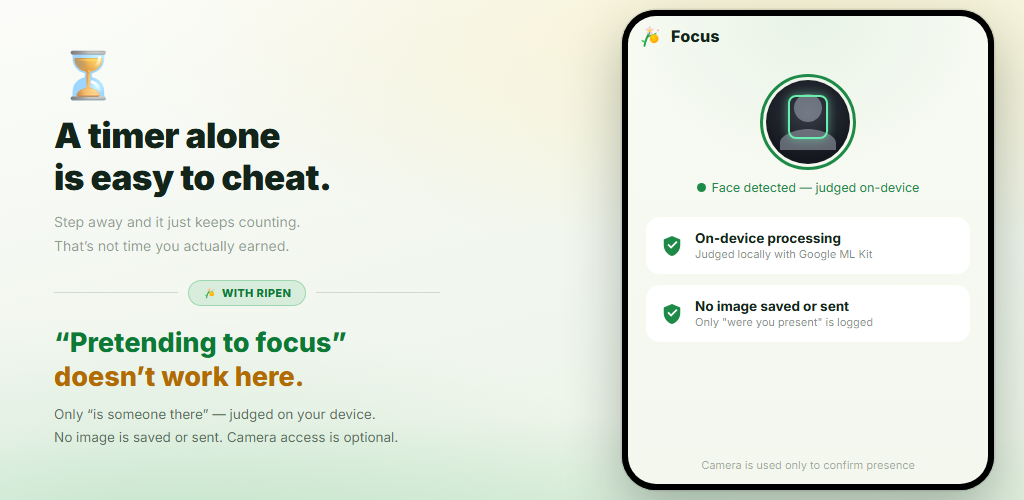
  • On-device face detection with Google ML Kit
  • No image or video is saved or sent (only seconds are logged)
  • Turn it off per window to focus with the timer alone
Presence check screen: the face is detected on the device and no image is saved or sent

Ripen in 40 seconds

Watch how you focus, harvest time, and see your apps lock once it’s spent.

Features

Turn “I want to stop but can’t” around — with rewards.

Reward loop

Every time you finish a focus timer, you earn time for social and video apps. Rewards, not willpower, change your behavior.

Presence check (on-device)

The front camera judges only whether you’re in front of the screen. It’s processed on your device and no image is saved or sent. You can turn it off per window.

Focus windows

Set multiple windows by day and time. Each window has its own focus goal, minutes, round cap and blocked apps.

Earn with words

Answer a set number of English word quizzes (4 choices) to earn a round. About 10,000 words by CEFR level, with a level check, review list and your own decks.

Pre-leisure

Minutes you can use the moment a window starts — even before you focus. They’re added on top of your focus rewards.

Settings lock

A commitment feature that stops you from tweaking settings for more leisure. Loosening changes require scheduling an unlock and waiting 1–30 days.

Analytics dashboard

Focus trends, a focus calendar, completion rate, your best focus hours and blocked-app usage trends — all visualized.

Today’s status in a notification

Without opening the app, a persistent notification shows usable time, the next focus window and the time left in your session. Finishing plays a sound and vibrates.

Light/dark · 12 languages

Choose a System, Light or Dark theme. The app is available in 12 languages, including English and Japanese.

A camera — and still peace of mind.

“A camera to check focus” can sound worrying. Ripen is designed privacy-first.

Processed entirely on-device

Face presence detection runs on your device with Google ML Kit. Video is never sent to an external server.

No images saved or sent

It only judges whether a face is there. Photos and video are never saved or sent. All it logs is how many seconds you were present and focused.

Data stays on your device

Focus records and settings are stored on your device and never sent to Ripen’s servers. If Android backup is on, your settings are included in your Google Account backup and restored when you reinstall.

No account, no ads

No sign-up or login, and no ads or analytics tools inside. Download it and start right away.

Before you start

  • Blocking apps requires the “Usage access” and “Accessibility” permissions. Ripen won’t open its home screen until both are on (Android requires you to enable them manually in Settings).
  • The camera permission is requested the first time you focus in a window with the presence check on. Windows with it turned off, and focus outside your windows, run on the timer alone without the camera.
  • It doesn’t make apps completely unusable — it’s a “soft” system designed to change your behavior. Outside your windows, blocked apps are free to use.
  • Face detection uses the front camera, so a well-lit place is recommended.
  • The app is available in 12 languages: Japanese, English, Spanish, Chinese (Simplified), Hindi, Arabic, Portuguese, Russian, German, French, Korean and Italian.

Frequently asked questions

Ripen doesn’t just forbid — it’s reward-based. Finish a focus timer and you earn that much time for social or video apps. Because it changes behavior with rewards instead of willpower, it’s easy to keep going.
Only to judge whether someone is in front of the screen (presence). It’s processed on your device (Google ML Kit), and no image is saved or sent. All it logs is how many seconds you were present and focused. You can turn the presence check off per window, and the camera isn’t used in those windows.
Blocking apps requires “Usage access” and “Accessibility”; once both are on, you can continue to the home screen. The camera is only for windows that use the presence check, and notifications are optional. Accessibility is used only to identify the app in the foreground and show the block screen — it never reads screen content.
No. Usable time you earn (including pre-leisure) resets when that window ends. It’s designed to be spent as that window’s reward, not hoarded.
Yes. For each window you choose how to earn: focus, words, or both. Words are 4-choice English vocabulary quizzes — answer the number you set (5–30) correctly to earn a round. About 10,000 words by CEFR level are built in, and you can paste your own words to make a deck.
Yes, it’s free. There are no in-app purchases, no ads and no account — download it and start right away.
Focus records, windows, blocked apps and other data are stored on your device and never sent to Ripen’s servers. If Android backup is on, your settings are included in your Google Account backup and restored when you reinstall with the same account.
Not yet — Ripen is Android only for now. It works on devices running Android 8.0 or later.

Start today and let your effort ripen.

Harvest free time for every bit of focus
On-device presence check — no images saved or sent
Rules by day and time window, auto-lock at 0 minutes
Free · no ads · no sign-up
Install free now

Download it from Google Play